 |  | January 24th, 2007 |
|
Belated Happy New Year from CEOExpress! Below we will be telling you about some great new features.
CEOExpress Mobile:
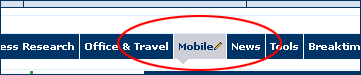
We are finally ready to share our new CEO Mobile 2.0 with you. Just click on your "Mobile" tab on your CEOExpress homepage. The new mobile site is more sophisticated and flexible than the prior CEO Mobile - it is set up like the new desktop CEOExpress, with tabs and nuggets. Access CEO Mobile on your handheld device at http://pda.ceoexpress.com. The Mobile tab on your CEOExpress homepage will enable you to customize your mobile CEOExpress from your PC as well as on your handheld device. (Don't have a Mobile tab on your CEOExpress homepage? You can add it at any time by clicking "Add Tab" on the left hand side of the page above your tabs menu-just click "Mobile".) Review this short demo to see how the new mobile site works.
Mobile Tab:
(Please Note: This first phase of mobile is designed for use on browser-enabled pdas and cell phones, ie the Treo, IPAQ, Q-phone and Blackberry. A WAP site with similar features for devices such as the Motorola Razr and most WAP enabled cell phones will follow.)
We'd love to hear what you think. Be sure to use the "Feedback" link in the Mobile tab, or at the bottom of the CEO Mobile page.
New Specialty Content:
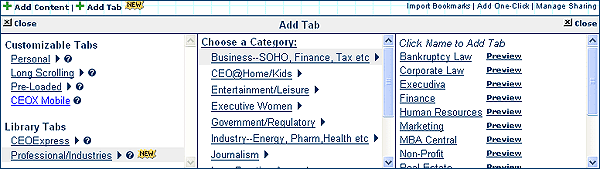
We are now offering a variety of new tabs that you can add to your CEOExpress homepage. Click "Add Tab" on the left hand side of the page, above your tabs menu. Select "Professional/Industries" under Library Tabs. The new tabs are broken into categories, such as Business, Medicine, CEO @ Home, and Industry. For instance there is an entire "Google" tab that includes every Google feature-you can see it all at once. Also, for those of you in auditing or a public company, there is a complete Sarbanes/Oxley tab. And, of course, there is ExecuDiva for the executive women in the group. It is easy to add this content. Select a category and click "Preview" to take a peek at any tab, or simply click the tab name to add it to your page.
Take a look:
Patricia's Favorite New Software:
A MUST have! This is FABULOUS software and worth ten times the price. Camtasia Studio enables you to do online demos of production quality with only a microphone and a computer. Mine are fairly basic and quick by design, but you should see the quality of some of the demos on their site. You can include video and questionnaires if you like, as well. I use Camtasia Studio to do quick demos like this. They literally take minutes to produce and publish. Minutes. I could go on and on about how easy and terrific it is, but they have a 30 day free trial, so try it yourself. You will love it. AND, the newest version -- out just a couple weeks ago -- has mobile capability, with both audio and video podcasting. Try it and let me know what you think.
Reset CEOExpress to "Default":
Have you been testing new features, made a lot of changes to your homepage, and just want to start over again? Now you can. By popular request, you can set CEOExpress back to "default," and return to all the original settings for your tabs and nuggets. To do so, click "My Account" in the upper right hand corner of the page, and click "Reset my Account to the Site Default."
Please note: Setting CEOExpress to default will delete all your custom tabs. You will only see the original CEOExpress tabs (Daily News, Business Research, Office & Travel, Breaktime, Tools, and News). HOWEVER, all personal links nuggets you have created in any tab that is deleted will be moved to your one original "My Links" tab (so you won't inadvertantly lose a links nugget that you wanted). New nuggets and tabs can be easily added at any time by clicking "Add Content" or "Add Tab" on the left hand side of the page, above your tabs menu. This is a permanent change, and cannot be reversed, but sometimes it is nice to "start over."
CEOExpress Marketplace:
We recently launched our new and improved CEOExpress Marketplace. You can find the link at the top of the homepage. Great deals and gift ideas can be found throughout the page. Be sure to check out the "Shop by Category" section in the upper left corner. And please check back frequently - we will be featuring new deals and suggestions regularly, and will soon be focusing on Valentine's Day. Have a favorite online shop? Let us know.
New Things for the Spring:
We have some great new features and improvements coming up soon that some of your CEOExpress colleagues are helping us test right now. We think you will be impressed :-) Stay tuned and keep sending suggestions.
Thank you for all your help and feedback. As always, feel free to send me a note. I truly enjoy hearing from you.
Best regards,

Patricia Pomerleau
CEO
CEOExpress Company LLC
617 482 1200
CEOExpress Mobile | CEOExpress Demo | Marketplace | Camtasia Studios
|
|